


Cloud & DevOps: from a local app to a reliable service Lesson 21 of 24
Domain, reverse proxy, and automatic HTTPS
Point DNS at the server, serve CloudLab through Caddy, and verify the TLS chain externally.
This text was translated with AI.
This lesson starts from zero. An unfamiliar word is not treated as your deficiency: we first build an image, then give it a precise meaning, and only then use it.
Where we are
Flight review. The previous lesson used the support provider console → user+public key → second login → firewall → updates → app. Without looking, name its four links, then compare with the written signal.
Lesson outcome
Point DNS at the server, serve CloudLab through Caddy, and verify the TLS chain externally. Do not move on until you can explain what every command verifies and which failure it can reveal.
Begin with a familiar image
In a large building, a visitor goes to reception rather than finding an employee’s internal room. A reverse proxy is that desk: it accepts the public secure connection, checks the requested address, and forwards it to the private application. A certificate is the desk’s identity document for a specific name.
An analogy starts reasoning but does not replace the technology. We make every word precise below.
The lesson’s support signal
domain → DNS → public 443 → Caddy → private app:8080; certificate proves name
Read the chain left to right. It answers not “which command should I memorise?” but “why does each step follow the previous one?”
New words in plain language
- Reverse proxy — A public intermediary that accepts and routes requests before an application.
- HTTPS — HTTP carried inside a TLS-protected connection.
- Certificate — A signed document binding a public key to a domain name.
- Port 443 — The standard public HTTPS port; the port itself is not encryption.
Take it apart without rushing
A reverse proxy accepts the public connection, terminates TLS, and forwards the request to the private application. Automatic certificates require the domain to resolve to the right IP and ports 80 and 443 to be reachable. Do not expose the application port publicly without need.
Do not memorise this wording. Find its cause-and-effect link and attach it to the support signal above.
Predict the result first
Before running anything, write what should change, what should remain unchanged, and which output would support your prediction. A wrong prediction is useful when you can explain the difference after observing it.
Experiment in small steps
Run the commands from the course/cloud-devops-lab root. The commands target a learning environment. Read a command in full and check the current directory before it changes a server or data. Run one meaningful group at a time. Stop after each group and compare evidence with your prediction.
export CLOUDLAB_DOMAIN=cloudlab.example.com
getent hosts "$CLOUDLAB_DOMAIN" 2>/dev/null || true
printf 'Caddy route:\n'
sed -n '1,80p' deploy/caddy/Caddyfile
printf 'After real DNS: curl -v https://%s/readyz\n' "$CLOUDLAB_DOMAIN"
What this experiment actually does
DNS must first point to the server. Caddy reads the domain, obtains a certificate, and forwards the request to the application’s private address. curl without -k checks certificate trust and the HTTP response together.
What you should observe
- The app is reached through the proxy, not a public port 8080.
- The command exits with a predictable status.
- The result can be repeated in a clean environment.
Rebuild the whole from the support map
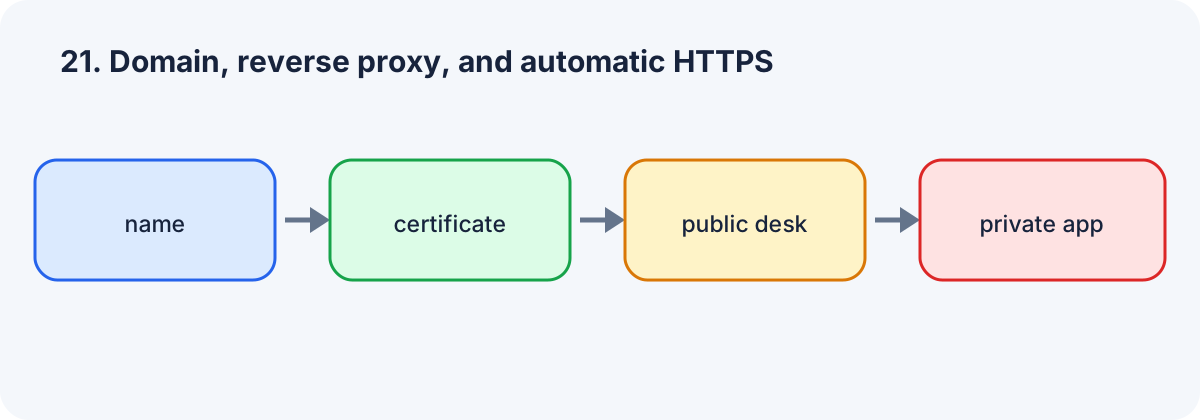
Follow the four blocks with a finger or pencil and tell the entire lesson as one connected explanation.
Recall without a prompt
- Hide the map and draw its four blocks from memory.
- Explain every transition using the word “because”.
- Define one new term without repeating the text verbatim.
- Name one signal that proves the result.
Find and correct the mistake
Mistake: “If the page opens with -k, HTTPS is configured correctly.” Correction: -k disables identity verification and can hide a wrong certificate.
Exercise
Now rebuild the same meaning yourself. You may use the support map; the goal is a repeatable result rather than a memory exam.
Required. Write a POSIX sh check for an HTTPS URL that requires valid certificate verification and HTTP 200 from /readyz, then prints the certificate expiry without -k. Submit only POSIX sh commands or a script, with no real keys or tokens.
Completion criteria
- You understand every line you run.
- A repeat gives the expected result or a safely explained difference.
- Output contains no real keys, tokens, or passwords.
- You can point to evidence that proves success.
If a check fails, record expected and actual results, revisit the one broken support link, and retry. An error does not remove your right to continue learning.
Optional. Write down one possible failure and the signal that would reveal it.
Open perspective
The next lesson adds a new support: OpenTofu and Ansible: infrastructure and configuration as code.
If you have found a mistake or a typo in this article, tell us about it
Comments (0)
Log in to leave a comment →
No comments yet. Be the first.