

Go: from zero to your own blog Lesson 23 of 50
Forms in Go: taking what the reader sent
The twenty-third lesson of the Go course. For the first time data travels the other way — from the reader to the server. The method and the field names, r.FormValue, why a check in the browser is not protection, and why a handler that changed something answers with a redirect instead of a page: otherwise F5 adds a second article.
Why this matters
For twenty-two lessons the reader has only received. The one thing they could do with the site was open an address.
A form is the first place where data travels the other way. It is also the first place where trust runs out: whatever arrives from outside can be anything at all, and checking it is your job.
The whole thing at once
A new folder, go mod init sabaq21. Inside it a templates folder, and in it list.html:
<!doctype html>
<html lang="en">
  <head><meta charset="utf-8"><title>{{ .Title }}</title></head>
  <body>
    <h1>{{ .Title }}</h1>

    <form method="post" action="/add">
      <label for="title">Article title</label>
      <input id="title" name="title" value="{{ .Draft }}" required maxlength="80">
      <button type="submit">Add</button>
    </form>

    {{ if .Err }}<p class="err">{{ .Err }}</p>{{ end }}

    <ul>
      {{ range .Articles }}<li>{{ .Title }}</li>{{ end }}
    </ul>
  </body>
</html>
Next to it, main.go:
package main

import (
	"bytes"
	"embed"
	"html/template"
	"log"
	"net/http"
	"strings"
	"unicode/utf8"
)

//go:embed templates/*.html
var files embed.FS

type Article struct{ Title string }

type page struct {
	Title    string
	Articles []Article
	Draft    string
	Err      string
}

var (
	tpl  = template.Must(template.ParseFS(files, "templates/*.html"))
	blog = []Article{{Title: "About the steppe"}}
)

func show(w http.ResponseWriter, code int, p page) {
	p.Title = "My blog"
	p.Articles = blog

	// Assemble in a buffer and only then send — the rule from the templates lesson.
	var buf bytes.Buffer
	if err := tpl.ExecuteTemplate(&buf, "list.html", p); err != nil {
		log.Println("template:", err)
		http.Error(w, "server error", http.StatusInternalServerError)
		return
	}
	w.WriteHeader(code)
	if _, err := buf.WriteTo(w); err != nil {
		log.Println("template:", err)
	}
}

func main() {
	mux := http.NewServeMux()

	mux.HandleFunc("GET /{$}", func(w http.ResponseWriter, r *http.Request) {
		show(w, http.StatusOK, page{})
	})

	mux.HandleFunc("POST /add", func(w http.ResponseWriter, r *http.Request) {
		title := strings.TrimSpace(r.FormValue("title"))

		switch {
		case title == "":
			show(w, http.StatusBadRequest, page{Err: "the title is empty"})
			return
		case utf8.RuneCountInString(title) > 80:
			show(w, http.StatusBadRequest, page{Draft: title, Err: "the title is too long"})
			return
		}

		blog = append(blog, Article{Title: title})
		http.Redirect(w, r, "/", http.StatusSeeOther)
	})

	log.Println("http://localhost:8080")
	log.Fatal(http.ListenAndServe(":8080", mux))
}
Run go run ., open http://localhost:8080, type a title and press Add. The article joins the list, and the address in the browser bar is unchanged — /, not /add. We will work out why below; first it is worth seeing.
Taking it apart
A form is a method, an address and field names
<form method="post" action="/add">
  <input name="title">
Three things, and all three matter.
action is where the request goes. method is how it goes. name is the key the server will look the value up by. That last one matters more than it looks: a field without a name is not sent by the browser at all. Not “sent empty” — not sent. It is the most common reason a form “does not work” while everything in the handler is correct.
id and label for have nothing to do with sending. They exist so a person can click the caption and land in the field, and so a screen reader can say what the field is.
GET shows, POST changes
The rule is not about Go. It is about HTTP.
GET is a request to show. It can be repeated as often as you like: the browser repeats it itself when the page is refreshed, a search engine opens it without asking, Back returns to it with no questions. Nothing is supposed to change.
POST is a request to change something: save, delete, pay.
From this comes a rule worth remembering before you need it: a “delete article” link that works over GET is a bug. Any crawler that simply walks your site’s links will open it, and articles will start disappearing on their own.
The method sits in the route itself, as in the lesson on routes:
mux.HandleFunc("POST /add", …)
You can no longer open /add in a browser: that is a GET, there is no handler for it, and ServeMux answers 405 Method Not Allowed by itself.
r.FormValue returns a string — only a string
title := strings.TrimSpace(r.FormValue("title"))
FormValue parses the request body and pulls out the value by name. There is no need to call r.ParseForm() separately — FormValue does it itself.
Three of its properties are worth knowing in advance.
It returns a string. Not a number, not a date — a string. Everything else you get yourself, with strconv.Atoi and its relatives.
It returns one value, the first, even when several fields carry that name.
An empty field and a missing field are indistinguishable to it: both are "". If the difference matters, take r.ParseForm() and r.PostForm.Has("title").
TrimSpace here is not decoration. A string of three spaces is not empty, but the title made from it is.
Check on the server, always
The form has required and maxlength. The browser will not let an empty field be sent. That is a convenience for a person, and only that.
A request may not come from a browser:
curl -i -X POST -d "title= " http://localhost:8080/add
There is no required and no maxlength here. There is only your handler:
HTTP/1.1 400 Bad Request
Picture it. A “please do not enter” sign and a lock on the door are not the same thing. A check in the browser is the sign: polite, useful, and seen only by people who were going to use the door anyway.
Length is counted in runes, not bytes:
utf8.RuneCountInString(title) > 80
That is the rule from the lesson on strings: len returns bytes, and a title of forty Kazakh or Russian letters suddenly turns out to be “too long”.
POST → redirect → GET
The most important thing in the lesson.
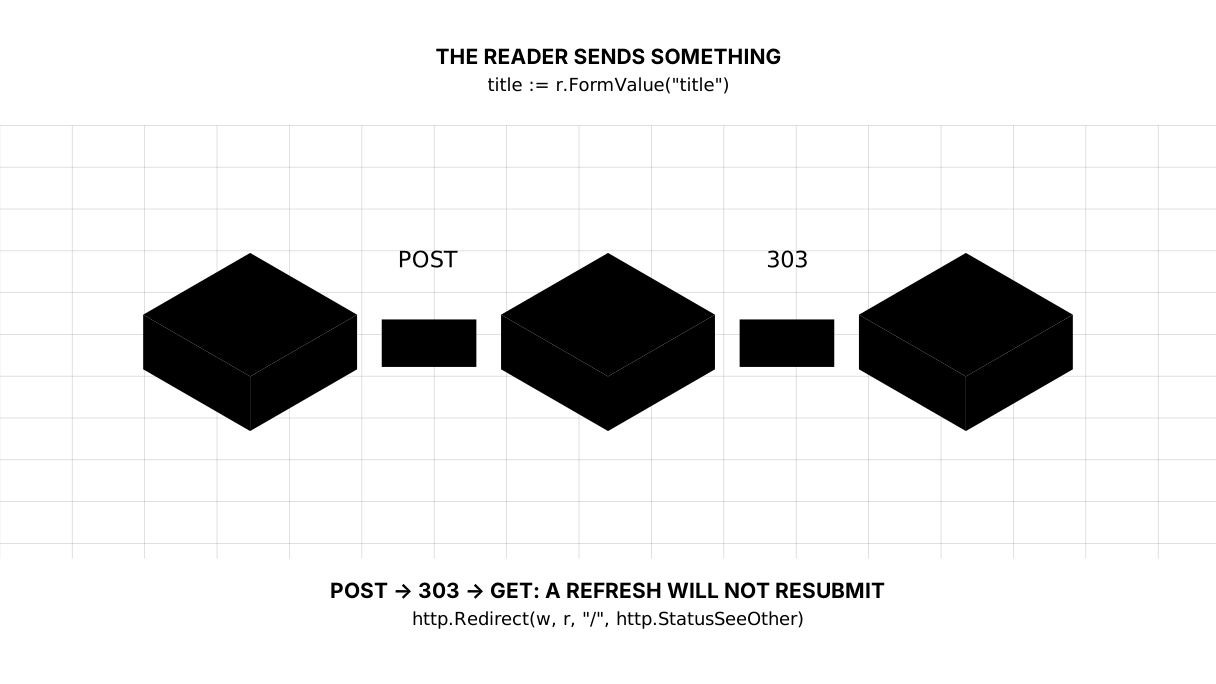
Imagine the /add handler simply drew a page after saving. The reader sees the list, is happy — and presses F5. The browser asks “resend the data?” and resends it. A second identical article appears. Then a third. The page at /add has no way to refresh without sending the form again, because that page is the answer to sending the form.
One line cures it:
http.Redirect(w, r, "/", http.StatusSeeOther)
A handler that changed something does not draw a page. It sends the browser to the page that does. The browser goes to / with a GET now, and / is what stays in the address bar. F5 is an ordinary GET, and there is nothing to repeat.
The code 303 See Other means literally: “look at this address, with GET”. Not 301 (that one is about moving permanently, and the browser will remember it) and not 302 (that one is historically ambiguous about the method).
Picture it. A shop receipt. You pay once, but you can look at the receipt as often as you like, and looking at it never takes money out of your account again.
An error is an answer too
show(w, http.StatusBadRequest, page{Draft: title, Err: "the title is too long"})
Two things at once.
First: 400, not 200. The request was wrong, and the answer is obliged to say so — not only to a person in words on the page, but to code.
Second: Draft: title. In the template that is value="{{ .Draft }}", so the field comes back filled in. The person typed eighty-five letters; making them type it all again is rudeness, not validation.
And the protection from someone else’s code already works
Type this into the form:
<script>alert(1)</script>
Text appears on the page. Text exactly:
<li><script>alert(1)</script></li>
This is html/template from the previous lesson. The difference is that until today the data came from you, and now it comes from a stranger, so the protection was needed for real.
The lesson map
Say it in your own words
Without looking, answer out loud or on paper. The answers are at the end of the lesson.
- Why does
requiredin HTML not replace the check in the handler? - What happens if the
/addhandler draws the page itself and the reader presses F5? - The reader submitted the form without filling the field in. What does that look like to
r.FormValue("title")?
Exercise
Required. Add a second field to the form — the article text, <textarea name="body">. Check on the server that it is not empty and no longer than 5000 runes. On an error return both strings the person entered, not just one. Show the article text in the list under the title.
Optional.
- Send the form through
curlwith notitlefield at all and see how that differs from an empty field. - Replace the
303with an ordinary page, add an article, and press F5. Read what the browser asks. - Put two
name="title"fields with different values into the form and find out which oner.FormValuereturns.
Where this goes in your blog
The blog has learned to receive. Next comes static: CSS, fonts, images — so the site looks like something, not only works.
Three debts taken on today, to be repaid later.
blog is an ordinary variable, and handlers change it, and handlers run at the same time. Two readers pressing Add in the same second are a race. It has its lesson on concurrency, and go run -race with it.
The slice lives in memory. Restart the server and the articles are gone. A database is waiting in the fourth module.
And the main one: someone else’s page can send a form to your address on behalf of your own reader. This is called CSRF, and it is defended against separately. The security lesson coming after forms is no accident — first you had to have something worth breaking.
Answers
Show the answers
- Because
requiredlives in the browser, and a request can come from anywhere: fromcurl, from someone else’s program, from a form on an outside site. A check in the browser helps a person not to make a mistake; only the handler protects you from wrong data. - A second identical article appears. The page at
/addis the answer to sending the form, and refreshing it means sending the form again. That is why a handler that changed data answers303and sends the browser to a page that can be refreshed as often as you like. - It returns an empty string — exactly what a missing field returns;
FormValuegives you no way to tell them apart. If you need the difference, callr.ParseForm()and askr.PostForm.Has("title").
Sources
If you have found a mistake or a typo in this article, tell us about it
Comments (0)
Log in to leave a comment →
No comments yet. Be the first.