

Go: from zero to your own blog Lesson 29 of 50
SQLite and database/sql: the first row from a database, not a slice
The twenty-ninth lesson of the Go course. The blog finally reads its articles out of a database file. The package and the driver, why sql.Open opens nothing, what a connection pool is, and why the foreign-keys pragma belongs in the connection string rather than in a query of its own. Plus ErrNoRows and checking for an error after the loop.
Why this matters
Last lesson you learned to talk to a database by hand. Today the program starts doing the same.
There are three places where nearly everyone trips, and none of them is about SQL. The program will say “connected” without having connected. A setting you switched on will turn out not to be on everywhere. And an error in the middle of a read will quietly fail to show up.
The whole thing at once
A new folder, go mod init sabaq26. The driver arrives with one command:
go get modernc.org/sqlite
main.go:
package main

import (
	"database/sql"
	"errors"
	"fmt"
	"log"
	"os"

	_ "modernc.org/sqlite"
)

type Article struct {
	ID    int64
	Slug  string
	Title string
	Words int
}

// open opens the database and makes sure it actually answers.
func open(path string) (*sql.DB, error) {
	// The pragma lives in the connection string, not in a separate query: the
	// pool holds several connections and a query would set up only one of them.
	db, err := sql.Open("sqlite", path+"?_pragma=foreign_keys(1)")
	if err != nil {
		return nil, fmt.Errorf("open %s: %w", path, err)
	}
	if err := db.Ping(); err != nil {
		db.Close()
		return nil, fmt.Errorf("database does not answer: %w", err)
	}
	return db, nil
}

func schema(db *sql.DB) error {
	_, err := db.Exec(`create table if not exists articles (
		id        integer primary key,
		slug      text    not null unique,
		title     text    not null,
		words     integer not null default 0,
		published integer not null default 0
	) strict`)
	return err
}

// add inserts an article and returns the number the database gave it.
func add(db *sql.DB, a Article) (int64, error) {
	res, err := db.Exec(
		`insert into articles (slug, title, words, published) values (?, ?, ?, 1)`,
		a.Slug, a.Title, a.Words)
	if err != nil {
		return 0, fmt.Errorf("add %q: %w", a.Slug, err)
	}
	return res.LastInsertId()
}

var ErrNotFound = errors.New("article not found")

// one fetches exactly one row.
func one(db *sql.DB, slug string) (Article, error) {
	var a Article
	err := db.QueryRow(
		`select id, slug, title, words from articles where slug = ?`, slug).
		Scan(&a.ID, &a.Slug, &a.Title, &a.Words)
	switch {
	case errors.Is(err, sql.ErrNoRows):
		return Article{}, fmt.Errorf("%q: %w", slug, ErrNotFound)
	case err != nil:
		return Article{}, fmt.Errorf("read %q: %w", slug, err)
	}
	return a, nil
}

// all fetches many rows — and checks for an error after the loop, not only inside it.
func all(db *sql.DB) ([]Article, error) {
	rows, err := db.Query(
		`select id, slug, title, words from articles where published = 1 order by words desc`)
	if err != nil {
		return nil, fmt.Errorf("list: %w", err)
	}
	defer rows.Close()

	var out []Article
	for rows.Next() {
		var a Article
		if err := rows.Scan(&a.ID, &a.Slug, &a.Title, &a.Words); err != nil {
			return nil, fmt.Errorf("scan row: %w", err)
		}
		out = append(out, a)
	}
	if err := rows.Err(); err != nil {
		return nil, fmt.Errorf("iterate rows: %w", err)
	}
	return out, nil
}

func main() {
	db, err := open("blog.db")
	if err != nil {
		fmt.Fprintln(os.Stderr, err)
		os.Exit(1)
	}
	defer db.Close()

	if err := schema(db); err != nil {
		log.Fatal(err)
	}

	for _, a := range []Article{
		{Slug: "dala", Title: "About the steppe", Words: 400},
		{Slug: "shanyraq", Title: "What a shanyraq is", Words: 1000},
		{Slug: "salem", Title: "Hello, world", Words: 150},
	} {
		id, err := add(db, a)
		if err != nil {
			log.Println(err)
			continue
		}
		fmt.Printf("added %s as number %d\n", a.Slug, id)
	}

	a, err := one(db, "dala")
	if err != nil {
		log.Fatal(err)
	}
	fmt.Printf("found: %d %q %d words\n", a.ID, a.Title, a.Words)

	if _, err := one(db, "kokek"); errors.Is(err, ErrNotFound) {
		fmt.Println("and there is no such one:", err)
	}

	list, err := all(db)
	if err != nil {
		log.Fatal(err)
	}
	fmt.Println("published:", len(list))
	for i, a := range list {
		fmt.Printf("  %d. %s — %d words\n", i+1, a.Title, a.Words)
	}
}
go run .:
added dala as number 1
added shanyraq as number 2
added salem as number 3
found: 1 "About the steppe" 400 words
published: 3
  1. What a shanyraq is — 1000 words
  2. About the steppe — 400 words
  3. Hello, world — 150 words
Taking it apart
Two things: the package and the driver
database/sql is a standard package, and it cannot talk to any database at all. It describes what working with a database looks like in general: open, ask, read a row. Who actually reads the file or speaks over the network is none of its business.
That is the driver’s job. We took modernc.org/sqlite, which is SQLite rewritten in Go entirely, so no C compiler is needed to build. There is another popular driver, mattn/go-sqlite3; it is faster, but it drags C along, and with it a separate struggle on Windows.
The driver is imported in a way that looks odd:
_ "modernc.org/sqlite"
The underscore instead of a name means “I do not need its functions, I need the package to be loaded”. On loading, the driver registers itself under a name, and that name is what you then pass to sql.Open.
The name is a common small misery. This driver’s name is sqlite, mattn’s is sqlite3, and most examples on the internet are written about the second:
sql.Open("sqlite3", "blog.db")
sql: unknown driver "sqlite3" (forgotten import?)
Go tells you honestly where to look: the name is not registered, and an import was probably forgotten.
sql.Open does not open anything
Here is the first trap. Try opening a database at a path that certainly does not exist:
db, err := sql.Open("sqlite", "/no/such/folder/blog.db")
error from sql.Open:  <nil>
error from db.Ping(): unable to open database file (14)
sql.Open returned nil, which means “all good”. It never went to the database at all: it checked that a driver by that name exists and prepared a pool. The first real contact happens only when you ask something.
db.Ping() is exactly “ask nothing”: a connection is opened, and if it cannot be, you find out immediately rather than on a reader’s first request. That is why open has both lines and not one.
Picture it. Writing a phone number down is not the same as calling it. Until you call, you do not know whether the number exists.
database/sql is a pool, not a connection
The second trap, and it is the more serious one.
*sql.DB is not one connection to the database. It is a pool: a set of connections opened as needed and reused. When you write db.Query(...), the pool hands out whichever connection is free and takes it back afterwards. Which one, you do not know.
Usually that is invisible and pleasant. Not at the moment you are configuring a connection.
The pragma lives in the connection string
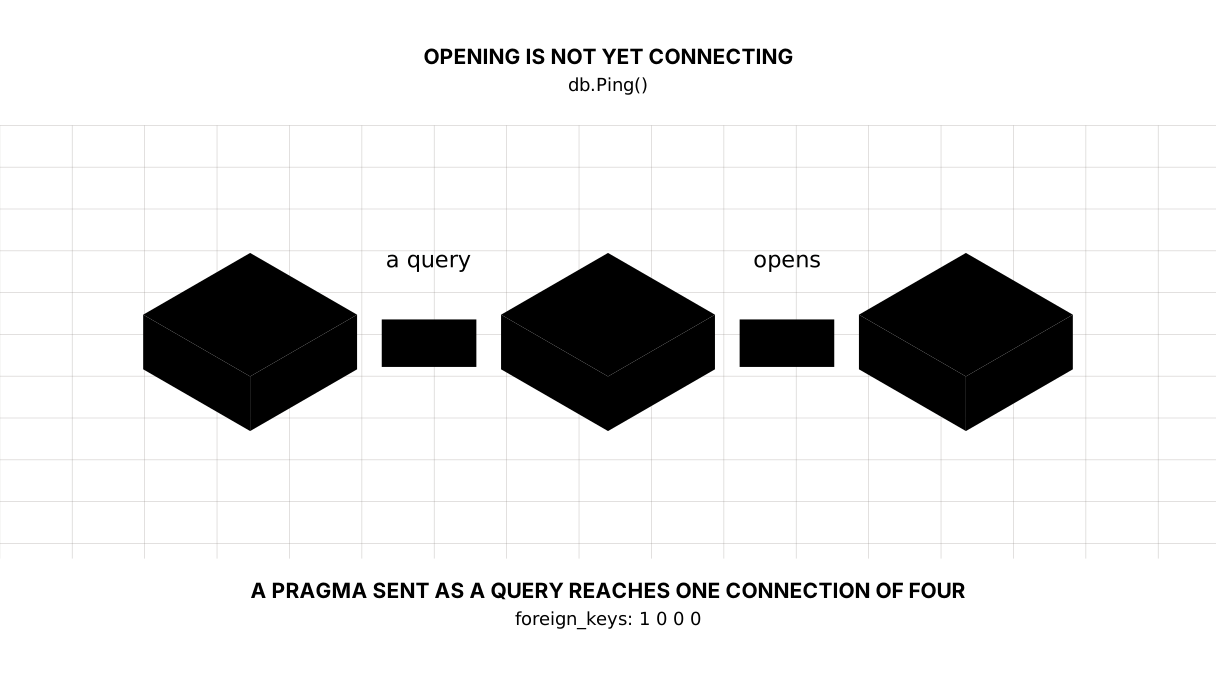
Remember pragma foreign_keys = on from last lesson? A pragma configures one connection, not the database as a whole. Here is what happens if you send it as an ordinary query.
I opened the database three ways and looked at four simultaneous connections in each:
as it is                   0 0 0 0
db.Exec("pragma …")        1 0 0 0
pragma in the DSN          1 1 1 1
The second way — db.Exec("pragma foreign_keys = on") — switched the checking on for one connection out of four: the one the pool happened to hand that query. The other three know nothing about it, and when a delete lands on one of them the foreign keys will not fire.
There will be no error. There will be orphaned rows.
The right way is to say it in the connection string, so the setting applies to every new connection:
sql.Open("sqlite", path+"?_pragma=foreign_keys(1)")
That is how open is written. Remember the shape: anything that configures a connection goes into the connection string.
One row: QueryRow, Scan and ErrNoRows
err := db.QueryRow(`select id, slug, title, words from articles where slug = ?`, slug).
	Scan(&a.ID, &a.Slug, &a.Title, &a.Words)
QueryRow takes exactly one row. Scan spreads its columns into variables, in order, and the addresses are passed with & because Scan writes into them.
The error comes back from Scan, not from QueryRow — which looks unfamiliar and exists so the whole thing chains onto one line.
“No rows” stands apart. It is not a breakage: the reader simply asked for an article that is not there.
case errors.Is(err, sql.ErrNoRows):
	return Article{}, fmt.Errorf("%q: %w", slug, ErrNotFound)
We translate sql.ErrNoRows into an error of our own, and here is why: whoever calls one should not have to know there is a database inside. SQLite today, Postgres tomorrow, a file the day after — and ErrNotFound stays the same. This is errors.Is from the errors lesson and the 404 from the logging lesson, joined up.
and there is no such one: "kokek": article not found
Many rows: Query, Next and the error after the loop
rows, err := db.Query(...)
if err != nil { ... }
defer rows.Close()

for rows.Next() {
	var a Article
	if err := rows.Scan(...); err != nil { ... }
	out = append(out, a)
}
if err := rows.Err(); err != nil { ... }
Four things are required, and the third and fourth are the ones most often forgotten.
defer rows.Close(): the connection is busy until the rows are closed. There is a subtlety worth knowing exactly: if the loop reads the rows to the end, database/sql closes them for you and nothing goes wrong. The trouble starts where the loop is left early — a break, a return, an error. Measured: with SetMaxOpenConns(1), after a break with no Close, the next query does not run at all and dies on a context deadline exceeded. That is why the defer goes in straight away rather than “when needed”.
rows.Err() after the loop is the non-obvious one. rows.Next() returns false both when the rows have run out and when the read broke halfway. Without rows.Err() those two are indistinguishable: you get half a list and no error at all.
A question mark instead of string concatenation
db.Exec(`insert into articles (slug, title, words, published) values (?, ?, ?, 1)`,
	a.Slug, a.Title, a.Words)
The values are passed separately from the text of the query. Never build a query by adding strings together — not even when “it is definitely a number here”.
The reason is that a concatenated query erases the boundary between command and data: text a reader sent becomes part of the command. This is called SQL injection and has a lesson of its own; today the habit of writing ? is enough.
As a bonus, ? saves you from wrestling with quotes and apostrophes: the name O'Hara breaks a concatenated query and passes through a ? untouched.
And since the database is now watching us, run the program a second time:
2026/09/06 11:28:34 add "dala": constraint failed: UNIQUE constraint failed: articles.slug (2067)
2026/09/06 11:28:34 add "shanyraq": constraint failed: UNIQUE constraint failed: articles.slug (2067)
2026/09/06 11:28:34 add "salem": constraint failed: UNIQUE constraint failed: articles.slug (2067)
found: 1 "About the steppe" 400 words
The unique from last lesson did its job: the database refused the same address a second time. There is no need to check for it in code — reading the error is enough.
The lesson map
Say it in your own words
Without looking, answer out loud or on paper. The answers are at the end of the lesson.
- Why does
sql.Openreturn no error for a database path that does not exist? - What is wrong with
db.Exec("pragma foreign_keys = on")? - Why is
rows.Err()needed when the error fromrows.Scan()has already been checked?
Exercise
Required. Replace the blog’s slice of articles with the database. All and Get in the blog package should read from SQLite, and the form should write. Return “no such article” as your own ErrNotFound, and let the handler still answer 404.
Optional.
- Remove
?_pragma=foreign_keys(1)and check whether the comments survive deleting an article. - Remove
defer rows.Close(), setdb.SetMaxOpenConns(1), and leave the loop after the first row with abreak. Make the next query withQueryRowContextand a two-secondcontext.WithTimeout, and read the error it returns. Then restore reading to the end and confirm that everything works even without aClose. - Build a query by concatenation and pass
' or 1=1 --as the address. See what comes back.
Where this goes in your blog
The slice goes, the database stays. Next come the four operations on an article — create, read, update, delete — all through forms that already exist.
Still open. We create and pass sql.DB by hand; once there is a third function it will want a store type. The schema is still created by the program at start-up, which stops working once there are ten tables and they begin to change — that is the migrations lesson. And we left SetMaxOpenConns alone, which matters for SQLite: only one writer at a time.
Answers
Show the answers
- Because
sql.Opennever contacts the database. It checks that a driver with that name is registered and prepares a connection pool; the first connection opens on the first real query. To check straight away, calldb.Ping(). - A pragma configures the connection it ran on, and
*sql.DBis a pool of several connections. The query lands on one of them, the rest stay unconfigured, and foreign keys get enforced only some of the time, with no error to show for it. That is why connection settings go into the connection string. - Because
rows.Next()returnsfalsein two different situations: the rows ran out, or the read broke.rows.Scan()will not tell you — it will not be called at all. Withoutrows.Err()you get an incomplete list and conclude that everything is fine.
Sources
If you have found a mistake or a typo in this article, tell us about it
Comments (0)
Log in to leave a comment →
No comments yet. Be the first.