


Informatics: build your own digital assistant Lesson 1 of 10
How the digital world works and what we will build
We will trace an ordinary photograph through a phone and the internet, see the eight-block route, and begin one project that will grow throughout all 72 lessons.
This text was translated with AI.
Where we are on the map
Today we will not memorise processor parts or write our first line of code. We first need the whole picture: which parts make up a digital system, why one part cannot replace the others, and what product we will gradually build.
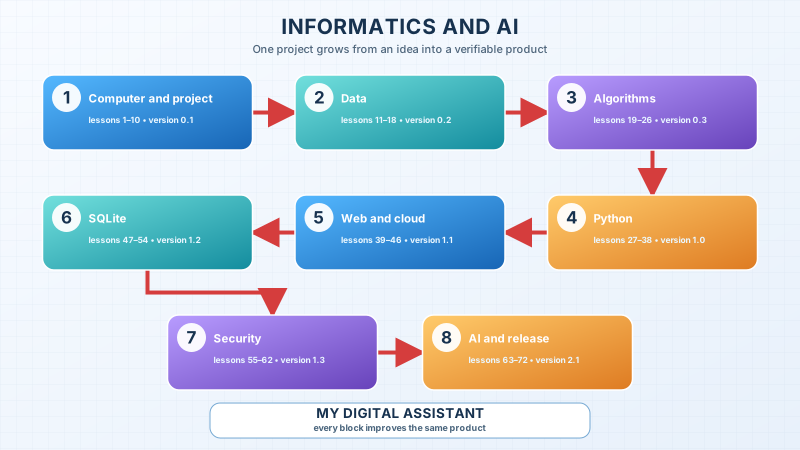
The red line shows the release order. These are not eight unrelated crafts. The same digital assistant passes through versions 0.1, 0.2, 0.3, 1.0, 1.1, 1.2, 1.3, and 2.1. Each version preserves abilities we have already tested and adds one new system of knowledge.
A familiar situation: a photograph in the class chat
Imagine a familiar action. You photograph the timetable and send the picture to the class chat. On the screen, it looks like two taps. Inside, a long chain of events occurs.
- The camera sensor measures light.
- The phone turns the measurements into numbers.
- Software gathers the numbers into an image file.
- Storage temporarily keeps the file.
- The messenger reduces the image and divides the data into parts for transmission.
- The operating system passes those parts to networking hardware.
- Routers carry them to a server.
- The server checks the request, stores data, and tells other phones about the new message.
- The recipient’s phone downloads the data and turns the numbers back into a visible image.
No participant in this chain understands the timetable in the human sense. The camera measures light, an algorithm transforms numbers, the network carries data, the screen produces light, and the reader finds meaning.
The contradiction
People often call a phone smart. Yet a powered-off phone does nothing. Software cannot run without a device. A device without software does not know what to do. Data without processing rules remains a sequence of states. A network without addresses does not know where to deliver a message.
“The phone did it” is therefore too short an explanation. To find faults and create our own products, we need to see the system and the limits of each part’s responsibility.
The precise model
A system is a set of connected parts that perform a task together. A system has a purpose, boundary, input, transformation, output, and state.
For the photograph example:
| Part of the model | Question | Example |
|---|---|---|
| Purpose | What should change for the user? | A classmate sees a readable timetable |
| Input | What enters the system? | Light, a tap, and the selected chat |
| Transformation | What happens to the input? | Encoding, compression, transmission, and reconstruction |
| Output | What can we observe afterwards? | The image appears in the intended chat |
| State | What must the system remember? | The file, recipient, time, and delivery status |
| Boundary | What belongs to our chosen system? | The phone, application, server, and network in this model |
The boundary depends on the question. When studying the camera, we care about the sensor and image processing. When studying delivery, we care about the application, network, and server. A useful model contains enough detail to answer the question and does not pretend to be a complete copy of the world.
New words without fog
- Data is a recorded representation on which a system can act: numbers, characters, pixels, or records.
- An algorithm is a finite and unambiguous description of steps for a class of problems.
- A program is algorithms and data written in a form a computer can execute.
- Hardware means the physical parts: processor, memory, display, storage, and sensors.
- Software means program instructions and data, including the operating system.
- An interface is the place and rules through which two sides interact: a person and an application, a program and a system, or two programs.
- A network is a set of connected devices that exchange data according to agreed rules.
For now, these definitions are a map. Each term will receive its own experiment and exact boundaries in later lessons.
The limit of the analogy
A computer is sometimes compared with a person: the processor is called a brain and memory is compared with remembering. This helps only at the first step. A processor has no human understanding or intention. Working memory does not remember the past; it holds states available to running software. We will therefore use an analogy as a bridge and always state where it stops being accurate.
The lesson’s support signal
a person sets a purpose
      ↓
input → program and algorithm → output
      ↕
 data ↔ memory and storage
      ↕
 network ↔ another system
The central idea is: a digital product is neither a screen nor code alone; it is a verifiable system for a human problem.
What we will build
The cross-course project is called My Digital Assistant. It will keep tasks, events, notes, and useful resources, find what is needed, and show learning workload. You may connect its theme to study, sport, books, games, a club, or a volunteer project.
The project will grow as follows:
0.0— a problem passport and a paper screen;0.1— a clear digital workspace;0.2— an exact data format;0.3— algorithms tested on paper;1.0— a Python command-line program;1.1— an accessible web interface and a cloud model;1.2— a SQLite database and verifiable reports;1.3— protection, logging, and recovery;2.0— a measured classification component;2.1— tests, instructions, and a handoff to the first user.
We use fictional records. The project must not contain a child’s real marks, messages, passwords, contact details, or other personal information.
Worked example: purpose before features
A weak idea says, “I will make an app with a beautiful calendar and AI.” It names tools but leaves the problem unknown.
A more precise statement is:
A learner forgets which assignments need more than one evening of preparation. The assistant should show those tasks early and explain why it raised their priority.
Now we can test the outcome. We create three fictional tasks, give each a deadline and expected duration, and check whether the assistant shows long work early. The first version does not need “AI”. A precise rule may solve the problem better.
Predict before observing
Suppose a note is visible on the screen. Which statement must be true?
- The note has already been saved to permanent storage.
- Some state exists from which the screen obtained its characters.
- The note was sent over the internet.
Choose an answer and explain your reason before reading the next paragraph.
Only the second statement is required. The text may exist only in working memory and disappear when the app closes. The application may work without a network. A visible screen proves the existence of state, but it does not prove permanent storage or transmission.
Recall without a prompt
Hide the diagram and draw the system for a photograph in a chat. Include:
- the person and their purpose;
- at least two inputs;
- a transformation;
- an observable output;
- state that must be kept;
- the network and a second system.
Open the page and find the first missing link. Correcting it matters more than producing a perfect first answer.
Find and correct the mistake
Arman wrote, “The internet stores my photo, and Wi-Fi shows it to my friend.”
The sentence mixes distinct roles. The internet is a network of networks, not one storage service. Wi-Fi connects a device to a local wireless network and does not draw the image. A particular server service usually accepts the file, the network carries data, the application receives it, and the display presents the result.
Rewrite Arman’s explanation as four short sentences with one actor in each.
Transfer to a new setting
Choose one action: paying a fare with a phone, starting an online game, or finding a route on a map. Name the purpose, input, transformation, output, and state. Then name one part outside your model’s boundary.
You do not have to guess every internal technology. The goal is to separate honest observation from assumption.
Project change: the version 0.0 passport
Create the first passport in a notebook or text file:
Name: My Digital Assistant
Theme: study / sport / books / games / club / useful project
User: a role without a real name
Problem: one observable difficulty
Three product actions: ...
Data the product will not store: ...
Evidence of value: how another person will check the result
“Helps with learning” is too broad. “Shows fictional tasks due in the next two days within 20 seconds” is testable.
Exercise
Required. Draw the photograph’s journey and complete the version 0.0 passport. Give one concrete situation for the problem and an observable check for the evidence of value.
With your own data. Take one safe fictional assistant record and show its input, state, and output.
Optional. Find a digital device at home without an ordinary screen. Explain its input, transformation, and output instead of replacing the explanation with the word “smart”.
Retrieval after 1, 7, and 30 days
- Tomorrow, rebuild the support signal without this page.
- After seven days, explain a different digital action as a system.
- After thirty days, compare the first passport with the working release and state what part of the purpose changed and why.
If you have found a mistake or a typo in this article, tell us about it
Comments (0)
Log in to leave a comment →
No comments yet. Be the first.