

Informatics: build your own digital assistant Lesson 14 of 18
A photograph as a grid of numbers
Break a photograph into pixels and check how numbers can describe the color at each position.
This text was translated with AI.
Where we are on the map
The previous block showed how to find files and separate a program from its data. Now we ask how data can carry meaning that another person and another program will read in the same way. State your first guess, test it with numbers, and record what you had to revise.
Everyday analogy and exact model
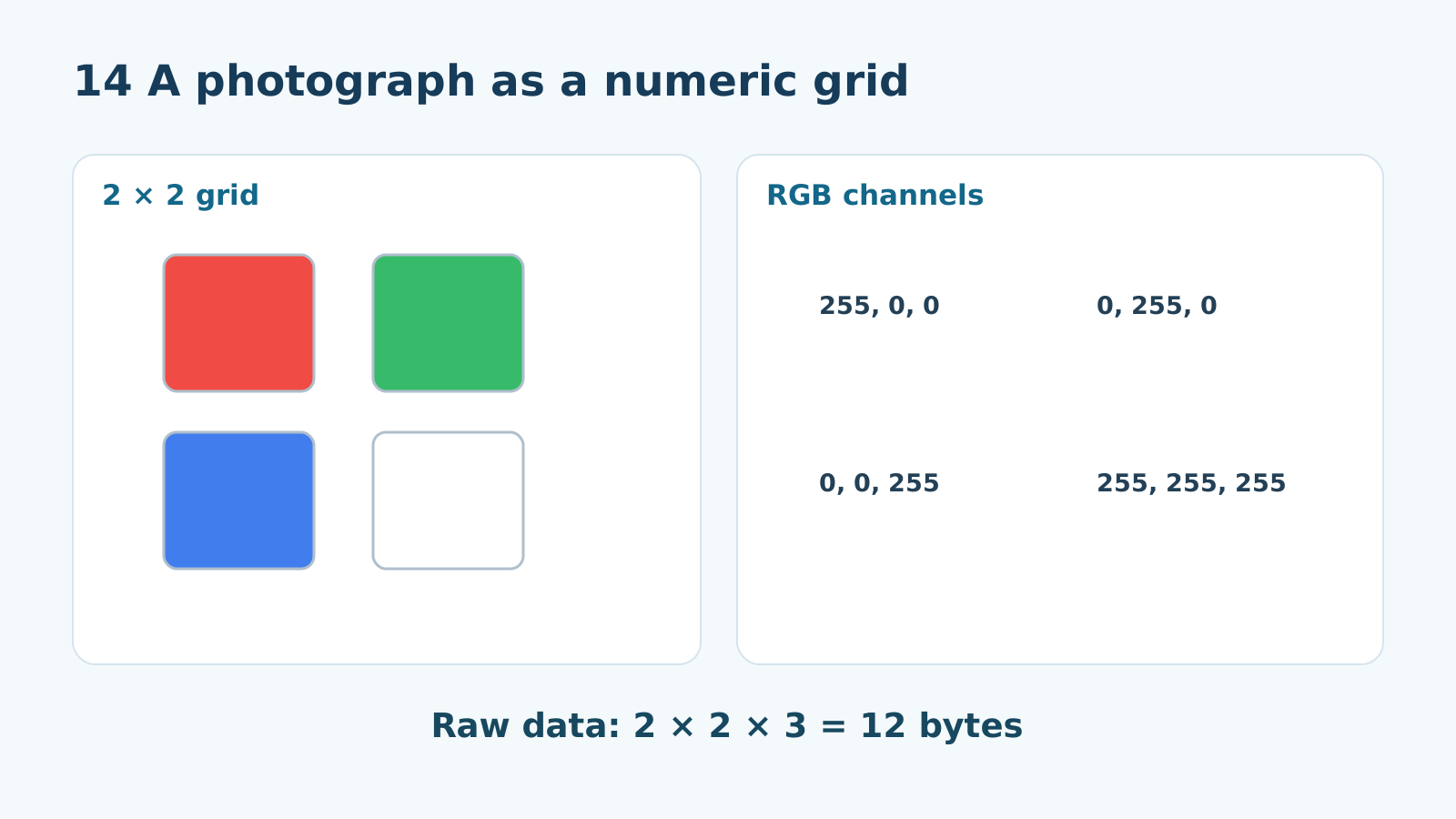
Stand back from a mosaic and you see a picture. Come closer and you see its pieces. A raster image also has separate positions called pixels; the squares in our diagram simply make these positions easy to inspect.
Each pixel has a position and a color. In a simple RGB model, three numbers from 0 to 255 describe red, green, and blue channels. Our 2 × 2 grid has red (255,0,0) and green (0,255,0) on top, blue (0,0,255) and white (255,255,255) below. If each channel uses eight bits without compression, color data requires 2 × 2 × 3 = 12 bytes.
Where the analogy ends
A complete file is normally larger than 12 bytes because it needs format and size information; compression can change the size too. A screen pixel and a photograph pixel are not the same physical grain. We are modeling a discrete grid of data.
The lesson’s support signal
row + column → pixel → (R,G,B); 2 × 2 × 3 = 12 bytes excluding headers
Worked example
Read the lower-left square in the 2 × 2 grid: blue (0,0,255). Change only that square to (255,255,255): the grid then has two white positions, and the other three positions stay as they were.
Predict before observing
How many raw color bytes does a 3 × 2 grid with three eight-bit channels need? Find six pixels and multiply by three: 18. Do not call that the actual PNG file size.
Do not jump straight to the answer. Write your prediction and its reason first. Compare each intermediate step as well as the final result. If you were right by chance, repeat with different values.
Reconstruct without a hint
Draw the 2 × 2 grid with all four colors, hide the diagram, and label its positions. Explain what changes if the top two pixels trade places.
Cover the worked example with paper. Reconstruct the chain from the short support signal, explain every transition aloud, and then reveal the example to check yourself. If stuck, look back at only the preceding step.
Find and correct the mistake
“A 2 × 2 image file is always four bytes.” Point out three channels per pixel and the file’s metadata. The corrected raw RGB color count is 12 bytes.
Transfer to a new situation
For a 4 × 4 assistant icon, calculate raw RGB data: 16 × 3 = 48 bytes. Why do a blurry photograph and a sharp icon of that same size have the same uncompressed amount in this model?
Project change
Draw a 2 × 2 assistant status icon and write its four RGB triples row by row. Add a rule to FORMAT.md: width and height first, then colors from left to right in each row.
Exercise
Change exactly one icon pixel. Record its position and old/new RGB values. Ask someone to reconstruct both images from the numbers and compare them.
Submit evidence that can be checked, rather than saying “I understood”: a table, calculation, file, or precise answer with a reason. Use fictional data. Ask another learner to repeat the action from your description; if they must guess, clarify the rule.
Return after 1, 7, and 30 days
Tomorrow recall RGB order. In a week calculate raw bytes for a 5 × 2 grid. In a month explain why file size is not just the number of pixels.
If you have found a mistake or a typo in this article, tell us about it
Comments (0)
Log in to leave a comment →
No comments yet. Be the first.