


Informatics: build your own digital assistant Lesson 3 of 10
Phones and laptops as systems
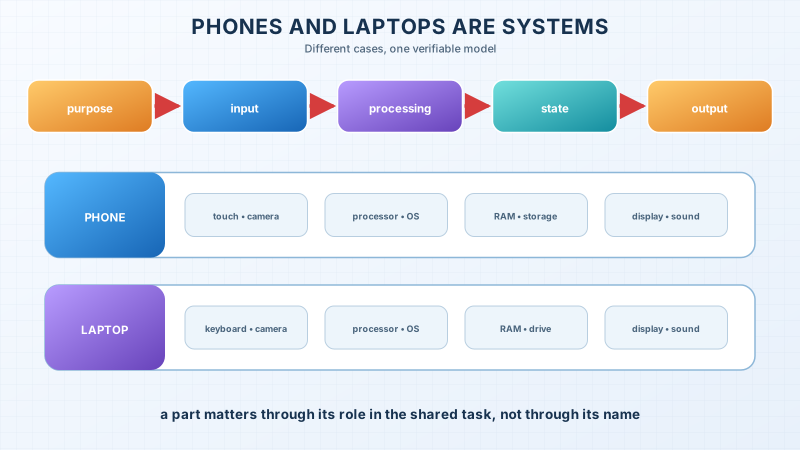
We will break a notification into roles and see why a phone and laptop look different but follow one model: input, processing, state, and output.
This text was translated with AI.
Where we are on the map
We began the project with a human problem. Now we need to understand the physical and software environment in which it will run. Today we look at a device from above: we do not memorise a parts list; we identify each part’s role in the shared task.
A familiar situation: a training reminder
At 17:00, the assistant should show a training reminder. The learner sees a short card and hears a sound. For that to happen, a clock provides time, software compares it with a saved deadline, the processor executes instructions, working memory holds current state, and the display and speaker create output.
Removing an essential connection changes the result. A device without power cannot execute the program. A deleted record supplies no deadline. Muting sound does not prevent the display from working, but it changes one output channel. This analysis helps us seek a cause instead of repeating, “The phone somehow does not work.”
The contradiction
A phone, laptop, game console, and cash machine look different. Yet all contain input, processing, memory, storage, and output. Appearance therefore does not define the system. Roles and connections matter more.
The precise model
A computing device is a physical system that receives signals, represents them as data, executes instructions, keeps state, and produces output.
- A component is a part with a defined role in the system.
- The processor executes instructions and operations on data.
- Working memory, or RAM, holds states needed by running software. Its ordinary contents disappear when power is removed.
- Persistent storage keeps files and programs after shutdown.
- A peripheral supplies input, output, or additional storage: a keyboard, mouse, camera, display, or drive.
- The power source supplies energy. A battery does not “store the program”; it supports the system’s physical operation.
A phone combines many components inside one case. A laptop’s keyboard and larger display are more visible. The difference does not change the shared model.
The limit of the analogy
A device resembles an orchestra: parts perform different roles, and coordination matters more than one instrument. However, no human conductor sits inside a computer. Hardware circuits and software perform control too. The analogy shows cooperation, but not the mechanism of execution.
The lesson’s support signal
user purpose
      ↓
input → processor + program ↔ RAM
                          ↕
                       storage
      ↓
output → observable result
A component name is useful only with the answer to this question: what role does the part play in this action?
Worked example
A user opens a saved note.
- Touching the display is input.
- The operating system tells the application which element was selected.
- The application requests the note’s data.
- Storage supplies the saved bytes.
- Required data and instructions enter RAM.
- The processor executes display instructions.
- The display produces visible text as output.
The processor does not search for a note in the human sense. The display does not store the text’s meaning. Storage does not decide what to show.
Predict before observing
An application is open, but another window covers it. Has the program disappeared from RAM? Not necessarily. It may remain a process and keep state even though its output is hidden. Observing the display does not reveal every working part.
A safe observation
Open the list of running applications or a system monitor on your device; do not stop anything. Compare visible windows with the process list. Record only an observation, such as “no window, process present” or “application absent”. Do not claim a cause until you have separated fact from assumption.
Recall without a prompt
Hide the diagram and draw the path for opening a file. Use input, program, processor, RAM, storage, and output. Show data direction with arrows. Then explain why RAM and storage cannot exchange places in the explanation.
Find and correct the mistake
“The phone has 256 GB of memory, so every application will run quickly.”
This sentence calls storage simply “memory” and draws an invalid conclusion. Persistent capacity is not RAM capacity and does not guarantee processor, program, or network speed. Rewrite the claim so that it states only a verifiable fact.
Transfer to a new setting
Analyse a payment terminal or game console. Name one component for input, processing, temporary state, persistent storage, and output. If you do not know a component, label it “assumption” and name a way to verify it.
Project change: the version 0.1 environment
Add this table to the passport:
| Assistant need | Device role | Required in the first release? |
|---|---|---|
| Enter a task title | keyboard or on-screen input | yes |
| Keep three records | persistent storage | yes |
| Show a list | display | yes |
| Determine location | location sensor | no |
Do not list brands. State a system capability first. We do not add location, camera, or microphone “for the future” when the problem does not require them.
Exercise
Required. Build the system model for opening a note and correct the 256 GB claim. Add at least five device needs to the project.
With your own data. For one fictional record, show where it exists before launch, during editing, and after saving.
Optional. Compare two devices by roles rather than advertising specifications. Explain which better fits the first release and why.
Retrieval after 1, 7, and 30 days
- Tomorrow, rebuild the system model from memory.
- After seven days, analyse a new device by the five roles.
- After thirty days, find one project decision that confused a device capability with a user need.
If you have found a mistake or a typo in this article, tell us about it
Comments (0)
Log in to leave a comment →
No comments yet. Be the first.