

Informatics: build your own digital assistant Lesson 9 of 10
Versions, collaboration, and accessibility
We preserve meaningful history, combine changes without overwriting another person's work, and test accessibility.
This text was translated with AI.
Where we are on the map
We preserve meaningful history, combine changes without overwriting another person’s work, and test accessibility.
Start with an observation rather than a definition. Open an object on your device that relates to the lesson and record only what you can see: its name, location, action, and result. Write your explanation of the cause separately. This prevents a guess from becoming a fact. After the experiment, compare the explanation with the precise model and repair only the link that was wrong.
A familiar image and the precise model
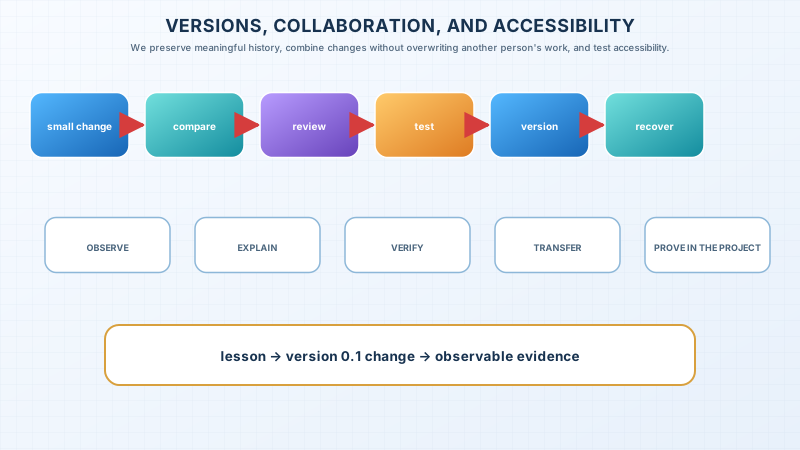
Files named final2-new do not explain ancestry. A version is a defined product state. A small change has a reason and check. Comparison shows differences, revert restores known state, and merge combines independent edits. Accessibility requires more than colour, keyboard reachability, and clear errors.
The limit of the analogy
The familiar image opens the topic but does not replace the mechanism. State where the analogy stops being accurate.
The lesson’s support signal
small change → compare → review → test → version → recover
Worked example
The change “reject an empty title” contains one rule, an error example, and a check. It is not mixed with colour or folder renaming, so it is easy to verify and reverse.
Predict before observing
Before the experiment, hide the continuation and predict the result in writing. Give the chain of causes from the support signal as well as the answer. Perform the action, record the observation, and compare it with the prediction. A match without an explanation is luck rather than understanding; a mismatch is useful evidence about the link that needs rebuilding.
Recall without a prompt
Hide the page, rebuild the signal, and explain every transition with a new example.
Explain the topic to someone who has not read the lesson. Do not use a new term until you have unpacked it in plain words. Then restore its precise name and show its place in the system. The listener should be able to predict the next step and give a different example. If they merely repeat a sentence, reduce the explanation to the support signal and rebuild it.
Find and correct the mistake
“We will add accessibility at the end.” Late structural repair costs more. Test contrast, headings, keyboard, focus, and messages now.
Transfer to a new setting
Apply the model to a device or file absent from the lesson. Separate observation from assumption.
Project change
Start a decision log and snapshot v0.1-foundations. Test the passport without colour and with keyboard only. Record one barrier and repair.
Keep four lines in the decision log: the intended result, the observation, the reason for the chosen action, and the verification. A screenshot can support evidence but cannot replace text and the working file. Do not use personal data: three fictional records provide the same testability and let you show the project safely to another person.
Exercise
Required. Complete the example, correct the error, and make the project change with a reason.
With your own data. Test the decision on three fictional records.
Optional. Ask another person to rebuild the explanation from the map.
The readiness criterion is concrete: reproduce the signal without the page, correct the proposed error, transfer the model to an unfamiliar example, and show the project change. If one part fails, return to that link instead of rereading the whole lesson. After repairing it, repeat only an equivalent task with different data.
Retrieval after 1, 7, and 30 days
Rebuild the signal tomorrow; solve an equivalent task after seven days; after thirty days, verify the decision in the project.
If you have found a mistake or a typo in this article, tell us about it
Comments (0)
Log in to leave a comment →
No comments yet. Be the first.